PER23 Digital Watch Face
PERSONA Watch FacePersonalization
4.1108.00 Reviews
- Version
- Varies With Device
- Installs
- 10.00K
- Age Rating
- Everyone
Screenshots
Our Review of PER23 Digital Watch Face
 Analysis by Appyee
I tend to choose a watch face by asking a practical question first: can I read the time quickly, and does the information on my wrist earn the space it takes up? A face can look polished in a preview yet feel busy during a commute, or offer a clean design that leaves me reaching for my phone. PER23 Digital Watch Face is aimed at people who want a more dressed-up digital look, and I’d judge it by how well that style fits the ordinary rhythm of checking a watch.
Starting with the right expectations
This is a paid personalization app from PERSONA Watch Face, priced at $2.99, for Wear OS. That platform detail matters: if you use an Apple Watch or another smartwatch system, this isn’t the watch-face change you’re looking for. Its Everyone age rating makes it broadly suitable, but the more useful question is whether you want a designed digital face rather than a plain system option.
The app has an average rating of 4.3 from around 636 ratings, with over 10,000 installs. Those figures suggest it has found an audience, but I wouldn’t treat popularity as a substitute for checking how its look and available information suit your own watch. The right face is personal: a layout that feels elegant to one person can feel too decorative to someone who mainly wants an uncluttered time display.
From install to a usable wrist display
Once you have it on a compatible Wear OS watch, the sensible first step is to make the face your own before relying on it through a full day. Take a moment to inspect the available appearance choices and settle on the version you can read comfortably in the lighting where you usually check your watch. A more vivid look can be appealing at home, for example, while a restrained style may be easier to live with in meetings.
My practical tip is to evaluate the face while doing something else, not by staring at it in a quiet room. Check the time while carrying a bag, walking outside, or glancing down during a conversation. That quick test tells you more about legibility and visual busyness than admiring a static preview. It also helps you decide whether the design feels like a useful instrument or merely a nice screen.
There is a small but important trade-off in choosing a custom face: you’re replacing the familiar arrangement you already know. Give yourself a little time to learn where your attention naturally lands. If your first glance goes to decoration instead of the time, try a different available theme before deciding the whole design is wrong for you.
A realistic day with the face
Picture a weekday morning: I’m getting ready, checking the time between making coffee and heading out, then glancing at my wrist while walking to the bus. A polished face can make those checks feel more intentional, but the real test is whether I can read it without pausing. Later, at work, I might prefer a quieter appearance that doesn’t draw attention when I check the time during a discussion.
That shift in context is why customization has practical value, even when it is mostly visual. I’d choose a calmer theme for a formal day and a more expressive one when I want the watch to act as an accessory. This is not a complicated workflow, but it helps prevent a common annoyance: choosing a striking design that looks good in isolation and then feels out of place with everyday clothes or surroundings.
If your priority is task management, navigation, or a dense set of live information, a watch face should not be expected to replace the relevant apps. I treat a face as the glanceable starting point, not as a complete dashboard for every part of my day. That distinction makes it easier to enjoy the styling without expecting it to solve needs it was not designed to meet.
First Impressions
Upon downloading PER23 Digital Watch Face, I was immediately impressed by how easy it was to install and set up. The app walked me through the process step by step, ensuring that even the most tech-challenged of us can get it up and running without a hitch. As soon as I activated it on my smartwatch, I was greeted with a beautifully designed watch face that looked like something straight out of a Bond movie.
Design and Aesthetics
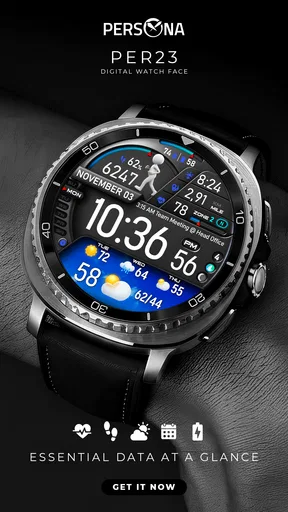
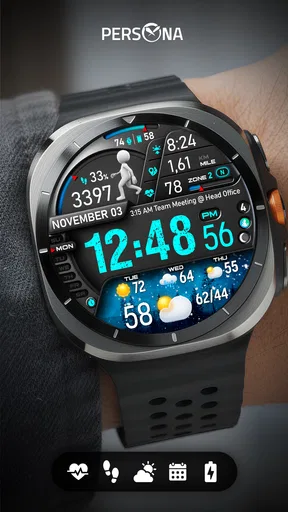
The design is where PER23 Digital Watch Face truly shines. It's all about minimalism and elegance with just the right touch of futuristic flair. The crisp, clear display offers a perfect balance of digital and analog elements. I love how the time is displayed prominently, with stylish hour and minute hands that hover over a dynamic digital background.
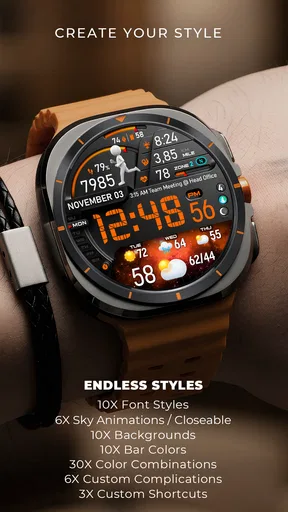
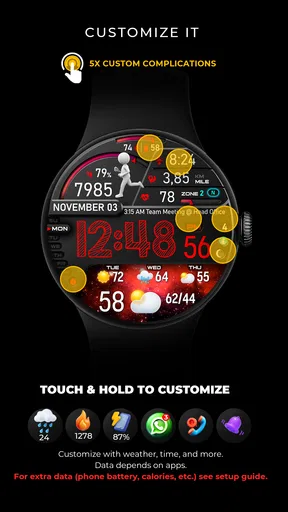
What’s more, there are multiple customization options. You can switch between different themes based on your mood or the occasion. Whether you want something vibrant and colorful or a more subdued, professional look, this app has got you covered.
That mix of visual styles is a matter of taste, not an automatic advantage. If you prefer a completely flat digital layout, the analog hands and layered look may be more ornament than you want. I’d use the available theme choices to find the least distracting version first; only then would I decide whether the more expressive options add something I’ll genuinely enjoy seeing all day.
Compared with the standard watch faces that come preinstalled on many watches, a paid design like this makes most sense when you want a distinct visual identity rather than another basic clock. Compared with building a custom face from scratch, it is the more straightforward route for someone who wants a finished design to personalize. If fine-grained control over every element is your main goal, a more flexible face editor may suit you better.
Features and Functionality
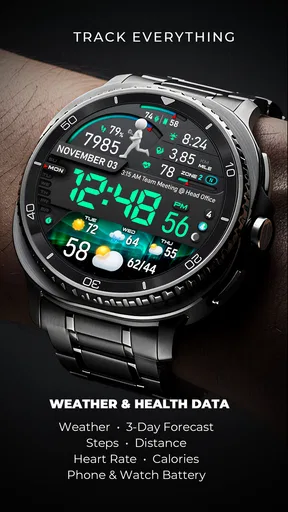
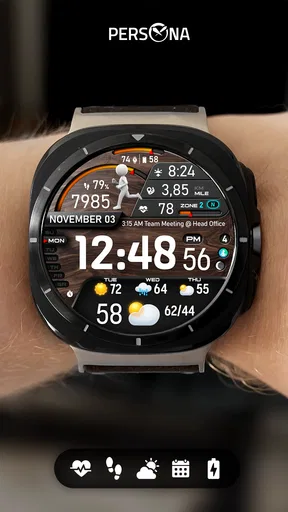
Beyond its looks, the app offers a suite of features that are both practical and user-friendly. The watch face provides real-time updates for weather conditions, which is super handy if you're someone who likes to be prepared for the day ahead. It also includes fitness tracking metrics like step count and heart rate, seamlessly integrating with your smartwatch’s health features.
One feature I particularly appreciate is the battery status indicator. It’s subtle yet effective, ensuring you’re never caught off guard with a dead watch. The app also syncs effortlessly with your calendar, so you can see your upcoming appointments right on your wrist.
For a useful handoff from the watch face to the rest of your day, decide which details you actually act on. If weather is what changes whether you take a coat, check that information during your morning routine; if calendar reminders guide your schedule, use a quick wrist glance as a prompt to open the relevant calendar details when needed. A face can make information easier to notice, but it does not remove the need to consult the underlying app for context.
I’d also avoid treating a glanceable metric as a full health record. Step count and heart rate can be convenient at a glance, but anyone who wants to review trends or understand a reading should use the watch’s health tools rather than assuming the face itself is a complete fitness interface. That’s a useful distinction for keeping the display informative without asking it to do too much.
Performance and Usability
Using the PER23 Digital Watch Face has been a breeze. The interface is intuitive and responsive, with no noticeable lag or glitches. It’s clear that the developers put a lot of effort into optimizing the app for smooth performance across different devices. Whether you're using the latest smartwatch or an older model, this app adapts beautifully.
The battery consumption is also well-optimized. I was worried about the potential drain on my smartwatch’s battery, but the app has proven to be efficient, barely impacting battery life. This is crucial for someone like me who values both functionality and longevity in their devices.
Even so, I’d keep an eye on the watch’s own battery over a normal day after changing faces. Power use can depend on the watch and how it is used, so my recommendation is to compare your usual routine rather than assume every setup will behave the same. If you notice a change that matters to you, switching back to a simpler face is an easy way to check whether the display choice is part of the issue.
The main friction is the boundary between personalization and information density. A face that tries to show time, style, and several useful details can feel crowded to someone who wants a nearly blank screen. Likewise, if you depend on a particular complication or need highly specific controls, confirm that the options available on your watch match your routine before paying for a design based on appearance alone.
Who should choose it, and who should look elsewhere
I’d recommend this to Wear OS owners who want their watch to feel more like a deliberate accessory, enjoy a digital display with an analog touch, and value having everyday information close at hand. It is especially appealing if you like changing the look to suit different settings instead of keeping the same plain face every day.
I’d skip it if you don’t use Wear OS, want a free option, or care more about maximum simplicity than visual character. It may also be the wrong fit if you expect a watch face to offer the deep controls of a dedicated calendar, fitness, or weather app. In those cases, the built-in face that best supports your specific needs—or a more configurable alternative—may be the smarter choice.
Final Thoughts
In a sea of smartwatch apps, the PER23 Digital Watch Face stands out for all the right reasons. It combines elegance with practicality, offering users a customizable and informative experience right on their wrists. Whether you're a tech enthusiast or just someone looking to elevate their smartwatch game, this app is definitely worth checking out.
So, if you're ready to give your smartwatch a sophisticated upgrade, head over to the app store and download the PER23 Digital Watch Face. Trust me, you won’t be disappointed!
My recommendation is to approach the $2.99 purchase as a choice about the face you’ll see repeatedly, not as a promise that a new display will transform how you use your watch. PERSONA Watch Face released it on January 26, 2024, and it remains a focused personalization pick: the value is in whether its design and glanceable information fit your habits. If that combination matches what you want from a Wear OS watch, it is an appealing way to refresh the experience; if you mainly need a different platform or a stripped-back clock, I’d choose another option.
Verdict
Strengths of PER23 Digital Watch Face
- Customizable interface for a personalized look.
- Battery-efficient design for longer usage.
- Real-time updates and notifications.
- Easy-to-read display, even in sunlight.
- Compatible with various smartwatch models.
Limitations of PER23 Digital Watch Face
- Limited free features without subscription.
- Some users report occasional lag issues.
- Requires constant internet for full features.
- Not all widgets are fully customizable.
- No offline support for certain functionalities.
Other Releases by PERSONA Watch Face
View All
PER12 Digital Watch Face
Personalization3.6

PER8 Digital Watch Face
Personalization4.0

PER32 Ultra Hybrid Watch Face
Personalization4.1

PER27 Digital Watch Face
Personalization4.2
Similar Picks in This Category
View All
Microsoft SwiftKey AI Keyboard
SwiftKey4.3

Wallpapers
Google LLC4.1

Zedge™ Wallpapers & Ringtones
Zedge4.7

Yandex Browser with Alice AI
Direct Cursus Computer Systems Trading LLC4.3

Ringtone Maker:create ringtone
Big Bang Inc.4.7

Fonts Keyboard
Fonts Keyboard3.9
Frequently Asked Questions
What features does the PER23 Digital Watch Face offer?
The PER23 Digital Watch Face provides a variety of features, including customizable time formats, weather updates, step tracking, and battery status indicators. Users can also personalize the watch face with different color themes and styles to match their preferences. This app is designed to enhance your smartwatch experience with both functionality and aesthetics.
Is the PER23 Digital Watch Face compatible with all smartwatches?
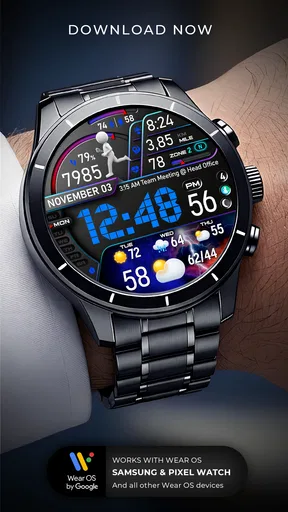
The PER23 Digital Watch Face is compatible with most smartwatches that run on the Wear OS platform. However, it is always a good idea to check the specific compatibility details on the app's download page to ensure it will work with your particular device model and OS version.
Does the PER23 Digital Watch Face drain battery life quickly?
While the PER23 Digital Watch Face is designed to be energy-efficient, its impact on battery life can vary based on usage and settings. Features like always-on display or frequent updates may consume more power. Users can adjust settings to optimize battery life, ensuring a balance between functionality and energy consumption.
Are there any in-app purchases or ads in the PER23 Digital Watch Face?
The PER23 Digital Watch Face offers a free version with essential features. However, there may be in-app purchases available for premium features or additional customization options. The app is ad-free, providing a seamless user experience without interruptions. Always check the app store description for details on pricing and features.
How do I customize the PER23 Digital Watch Face to suit my style?
Customizing the PER23 Digital Watch Face is simple and user-friendly. After installing the app, navigate to the settings menu where you can choose from various color themes, font styles, and complications. You can also adjust the display settings to highlight the information most important to you, making your smartwatch uniquely yours.
